*Please note that this blog post may contain affiliate links*
If you want to create sound effects faster and come up with textures you would not normally build by hand, Phuze by SoundMorph is an interesting tool to look at.
What makes it stand out is simple: it is a layering engine built around frequency bands. Instead of stacking sounds in the usual way, it splits the result into lows, mids, and highs, and each band can pull from its own set of samples. That is a pretty cool idea for sound design, especially when you want fast variation, weird textures, and abstract results.
After spending some time with it in Reaper, I found that it does some things really well, and some things not so well. If your focus is sci-fi, robotics, UI, magic, or abstract design, there is a lot to like here. If you want grounded, realistic impacts, I think its strengths start to fall away.
What Phuze actually does
At its core, Phuze is a sample layering tool.
But instead of treating your layers like one full-range stack, it lets you load sounds into three separate frequency zones:
- Low band
- Mid band
- High band
Each band can hold four samples. Those samples only live inside that band’s frequency range. You can also change the band widths and move the crossover points around.
That means the low end of your result might come from one set of sounds, while the mids and highs come from other pieces. This can create textures that feel fresh very quickly. I have not seen many tools do layering in exactly this way, so the concept itself is genuinely interesting.
If you already work with layered sound design a lot, you can think of this as a fast experimentation tool that pushes you toward unusual combinations. If you are newer to building effects, this kind of system can also help you hear how much character comes from different parts of the frequency spectrum.
If you want more general help with building layered effects from scratch, this breakdown of a sound design workflow for creating almost any sound effects is a good companion to this kind of plugin.
Quick interface overview
Once you get used to the layout, the interface is fairly simple.
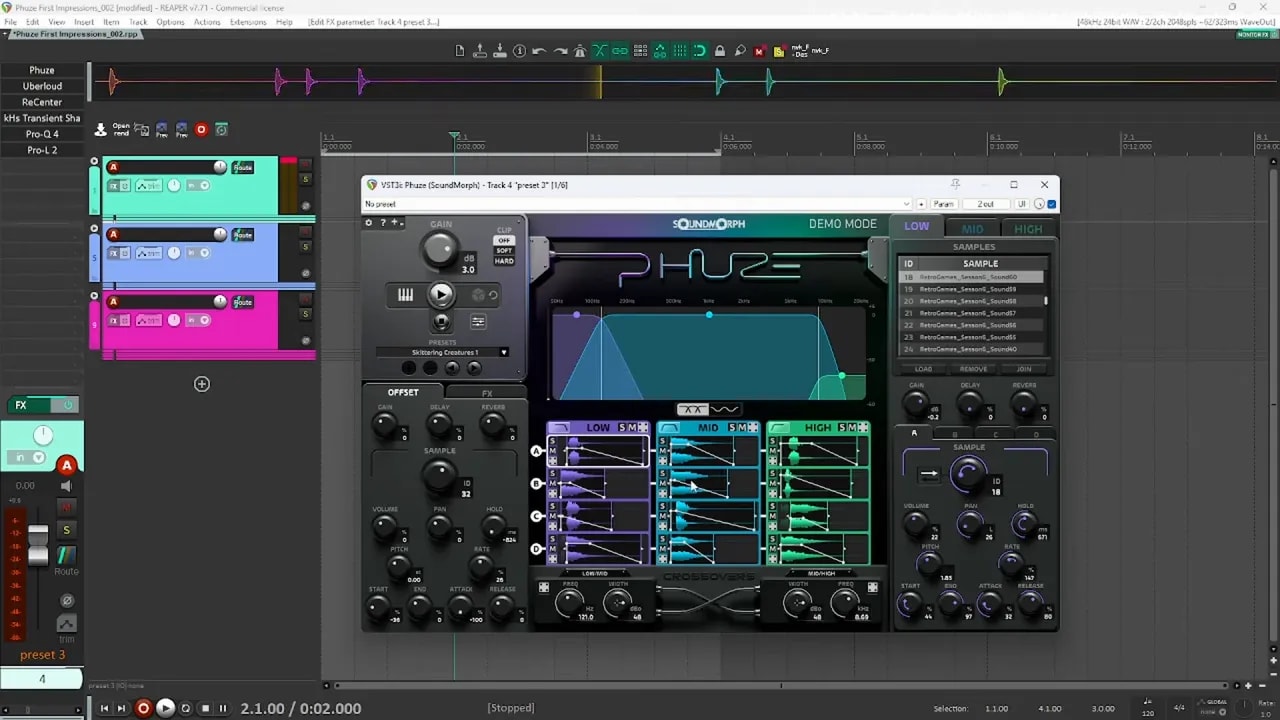
Main controls
- Gain for the overall plugin output
- Play to trigger the current sound
- Randomize to shuffle samples and any parameters set to randomize
- Stop to kill long sounds that keep ringing out
- MIDI trigger to trigger sounds from a keyboard
- Clipper with hard and soft options
The three-band layout
The middle of the interface is the main visual area. You see the low, mid, and high bands there, and those match the sample banks below. Each of those banks can hold four loaded samples at once.
Within each set of samples, you can randomize things like:
- Start time
- End time
- Fade in
- Fade out
- Hold
Per-sample editing
On the right side, you can get very specific. You can pick a band, then pick sample A, B, C, or D, and adjust that one sample on its own.
This includes things like:
- Sample selection
- Volume
- Pan
- Pitch
- Rate
So if you want fine control, it is there.
Offset controls
On the left side, there are master-style offset controls. These are very useful.
Instead of changing every sample one at a time, you can offset all of them together. For example, if your current setup sounds close to what you want, you can shift the sample choice across all layers and get a new variation without rebuilding the patch.
You can do the same kind of offsetting with other parameters too, like volume, pan, and hold. This is one of the stronger parts of the plugin because it makes variation quick.
Effects and band controls
There are also built-in effects like delay and reverb. These can help add tail and width, especially for cinematic or sci-fi work.
You also get controls for:
- Band gain
- Band width
- Crossover shaping
How randomization works in practice
The big workflow idea in Phuze is simple:
- Load a group of related samples
- Hit randomize
- Keep the good accidents
- Refine from there
That is where this plugin feels fun.
When you hit randomize, it can shuffle not just the chosen samples, but also many settings tied to timing and shaping. So one click can completely change the result.
At the same time, you are not forced to randomize everything. Many controls have a ring around them that shows how much they can be modulated or randomized. If you do not want reverb or delay to keep changing, for example, you can reduce that random range to zero or turn randomization off for that parameter.
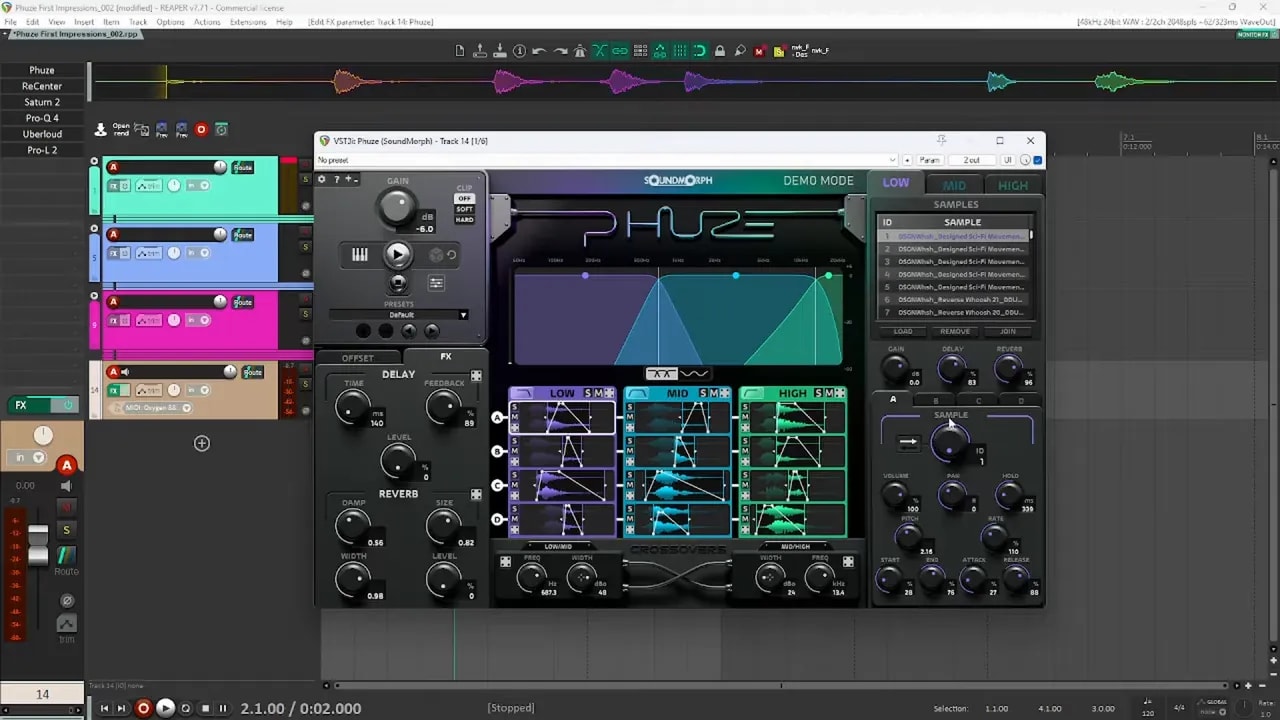
That is important, because once you land on a sound you like, you usually want to lock in part of it and keep exploring around it instead of starting from zero every time.
First test: building whooshes
One of the first things I tried was loading a set of whoosh sounds into the plugin.
I loaded the same whoosh set into all three bands. For quick testing, I found this to be one of the easiest ways to get useful results fast. You can absolutely try different material in each band, but using the same source set across lows, mids, and highs gives you a cleaner comparison and helps you hear what the band splitting is doing.
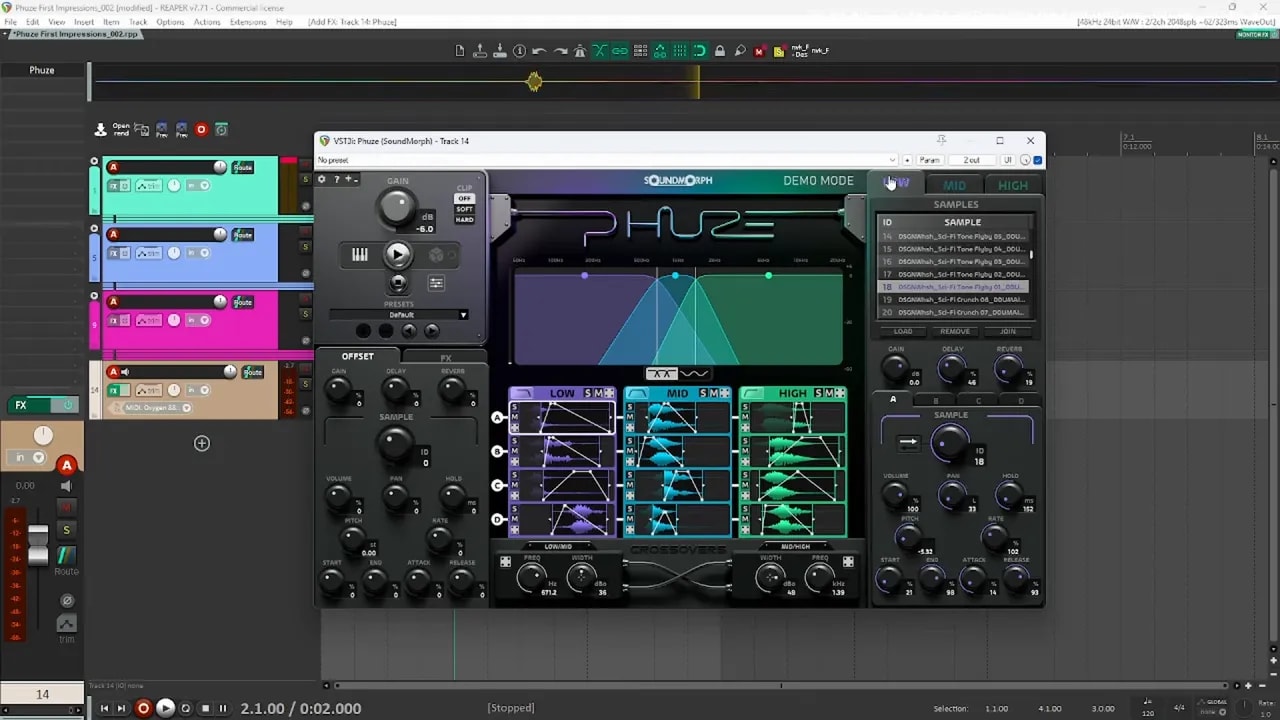
After loading the sounds, it was basically just a matter of hitting randomize and listening.
The result was good right away for this kind of material. With some delay and reverb added, the sounds became wider and more cinematic. Without the effects, the result was much drier and more direct.
This is where Phuze starts to make sense quickly. It can generate:
- Sweeps
- Transitions
- Abstract motion textures
- Cinematic tails
- Interesting layered pass-bys
Another nice trick is using the sample offset after finding a good result. Instead of losing the sound you like, you can scan through nearby sample combinations and get alternate versions that feel related.
That is useful when you need a family of sounds instead of just one. For game audio and UI work, that kind of quick variation is a big plus.
Using shuffle scope to keep what works
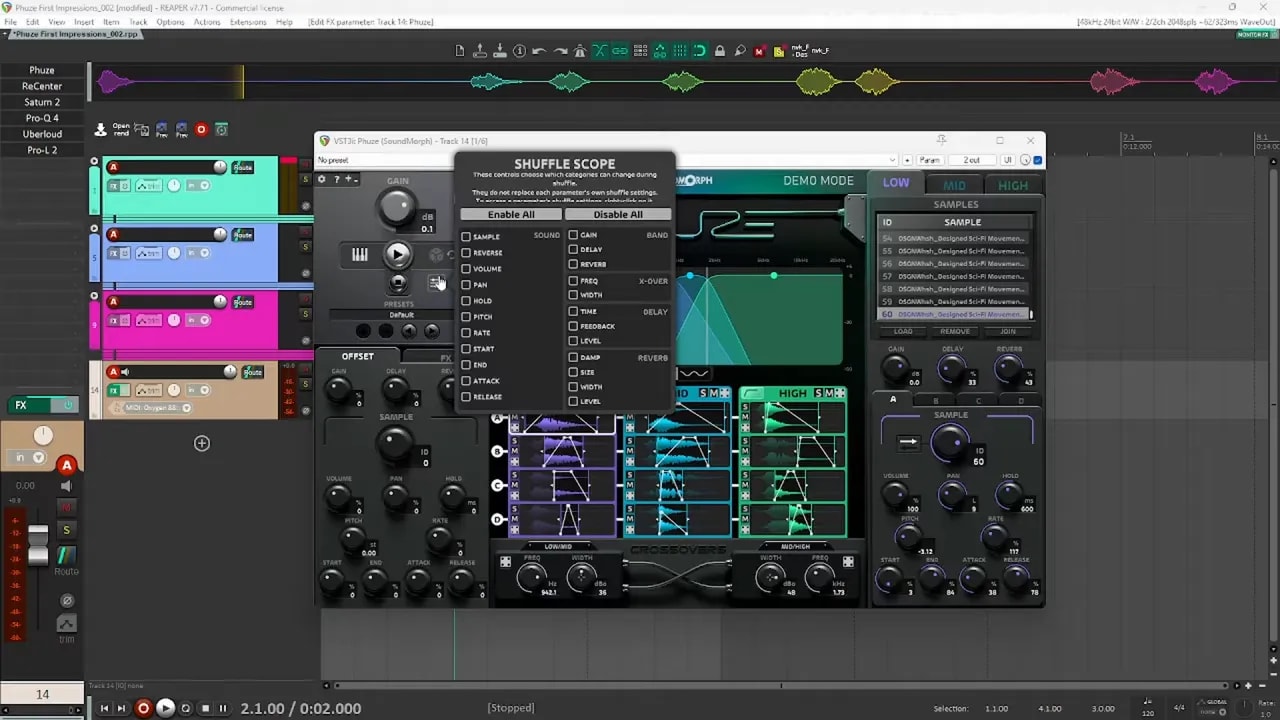
Phuze also has a feature called shuffle scope. This decides what the randomizer is allowed to change.
For example, if you like the exact samples already loaded but want new timing, fades, or movement, you can tell it to leave the sample choices alone and only randomize the other settings.
That gives you a second type of variation:
- Sample variation by offsetting or changing loaded sounds
- Playback variation by changing timing and shaping while keeping the samples
That is a smart design choice. It lets you stay close to a good result while still getting new ideas.
Where Phuze sounds strongest
After trying a few different kinds of source material, a pattern became pretty clear.
Phuze is strongest when the goal is stylized, abstract, futuristic, or synthetic sound design.
I tried several groups of sounds and got the best results from these kinds of sources:
- Retro sounds
- UI sounds
- Robotic creature sounds
- Technology textures
- Mechanical elements
- Sci-fi material
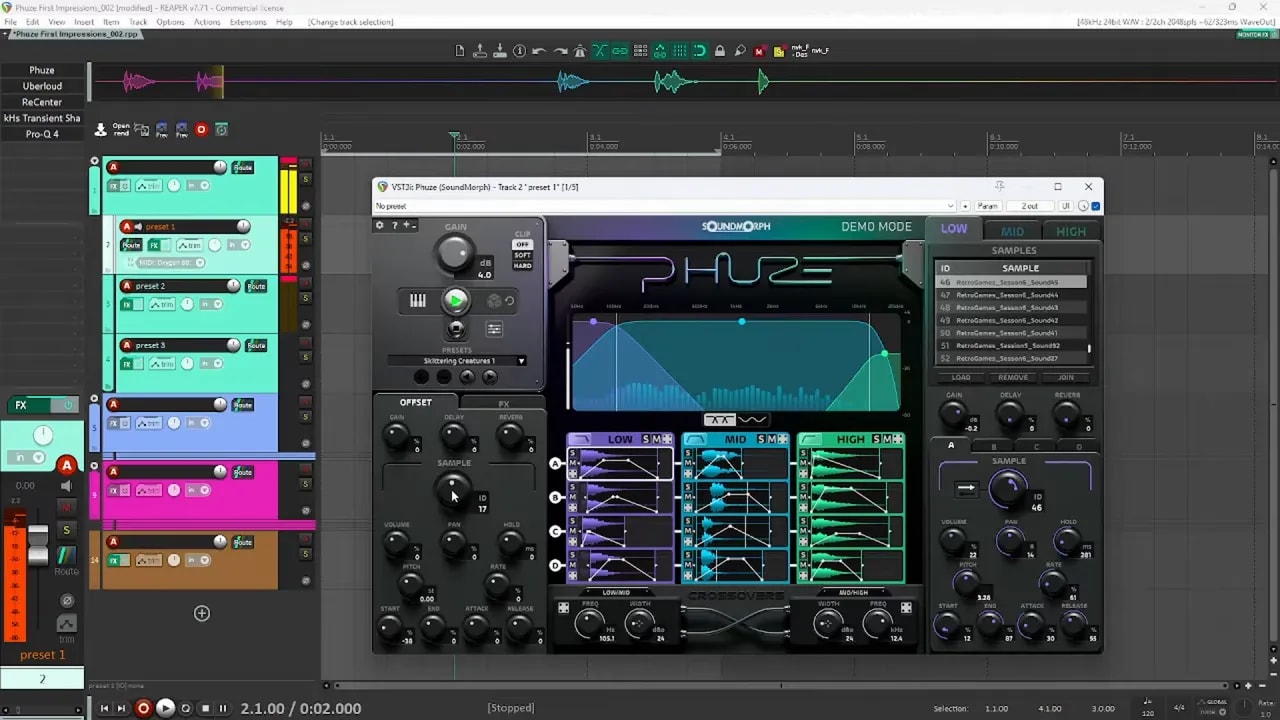
With those kinds of sounds, the frequency-based layering creates results that feel exciting rather than broken apart. The split bands can give you movement and texture in a way that actually helps the sound.
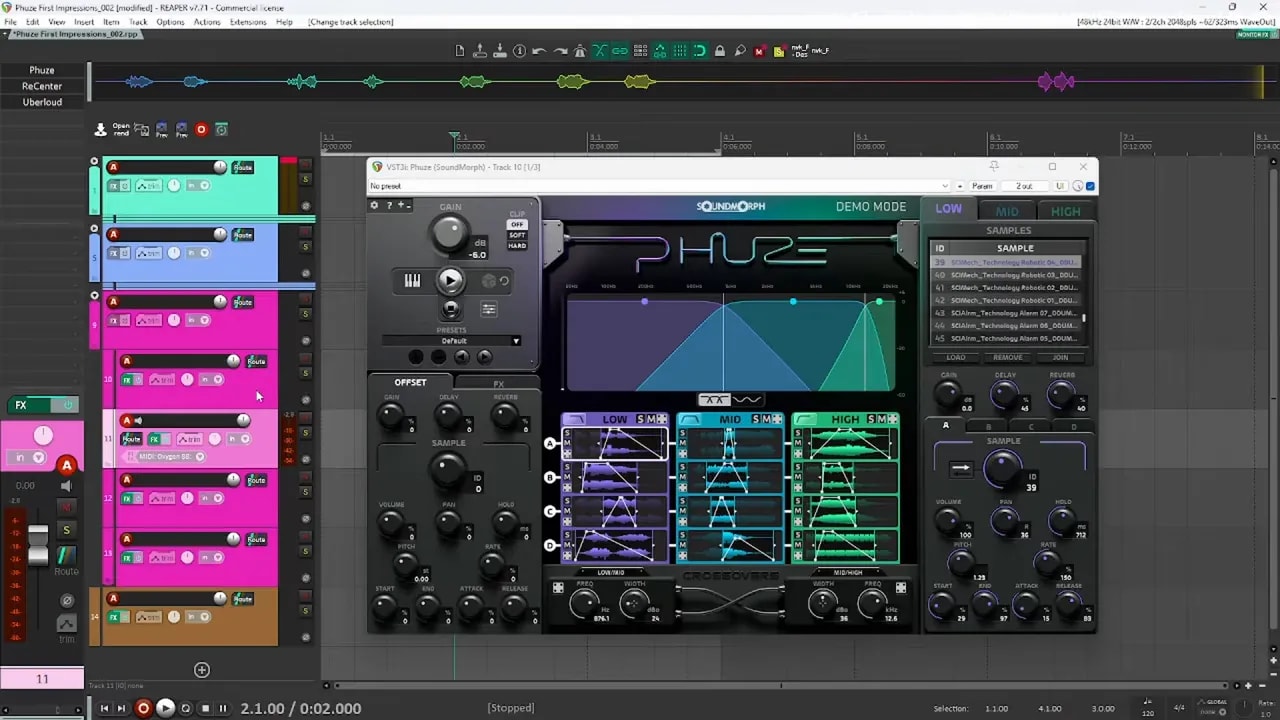
This is why I think Phuze works well for:
- Sci-fi interfaces
- Robot and creature design
- Mechanical layers
- Magic and fantasy textures
- Abstract transitions
- Experimental sound design
If you are looking for libraries to feed a tool like this, I would point you toward collections with lots of distinct textures and tonal shapes. Sound sets with varied robotic, weapon, fantasy, or retro material tend to be a better fit than plain real-world recordings. There are some strong options in these sound packs and libraries.
Where it struggles: realistic and grounded sounds
The weaker side of Phuze showed up when I tested it with more realistic material.
I tried water impacts first. The idea was to see whether the plugin could create believable splashes or impact-style water hits from a pool of water recordings.
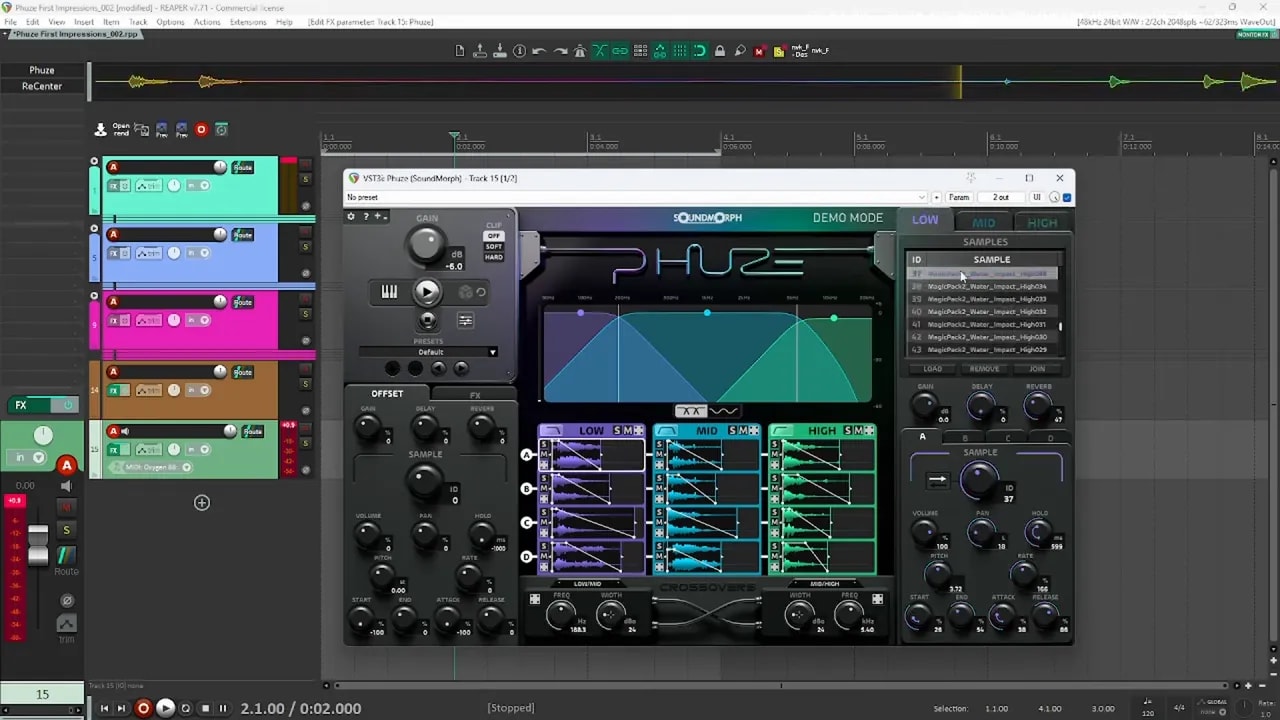
To give it the best chance, I adjusted the settings so the sound would start right at the beginning of each file:
- Brought the start closer to the front
- Reduced attack so the transient would come through
That helped a bit. But the result still felt disconnected.
The problem is that realistic sounds often need the whole sound to behave as one event. When the lows, mids, and highs are being pulled from different files, the ear can pick up on that split. Instead of sounding like one splash, it can sound like pieces of different splashes glued together.
That can be cool for magical water, stylized spells, or fantasy liquids. But for grounded realism, it did not feel convincing to me.
I had a very similar reaction when testing metal weapon hits.
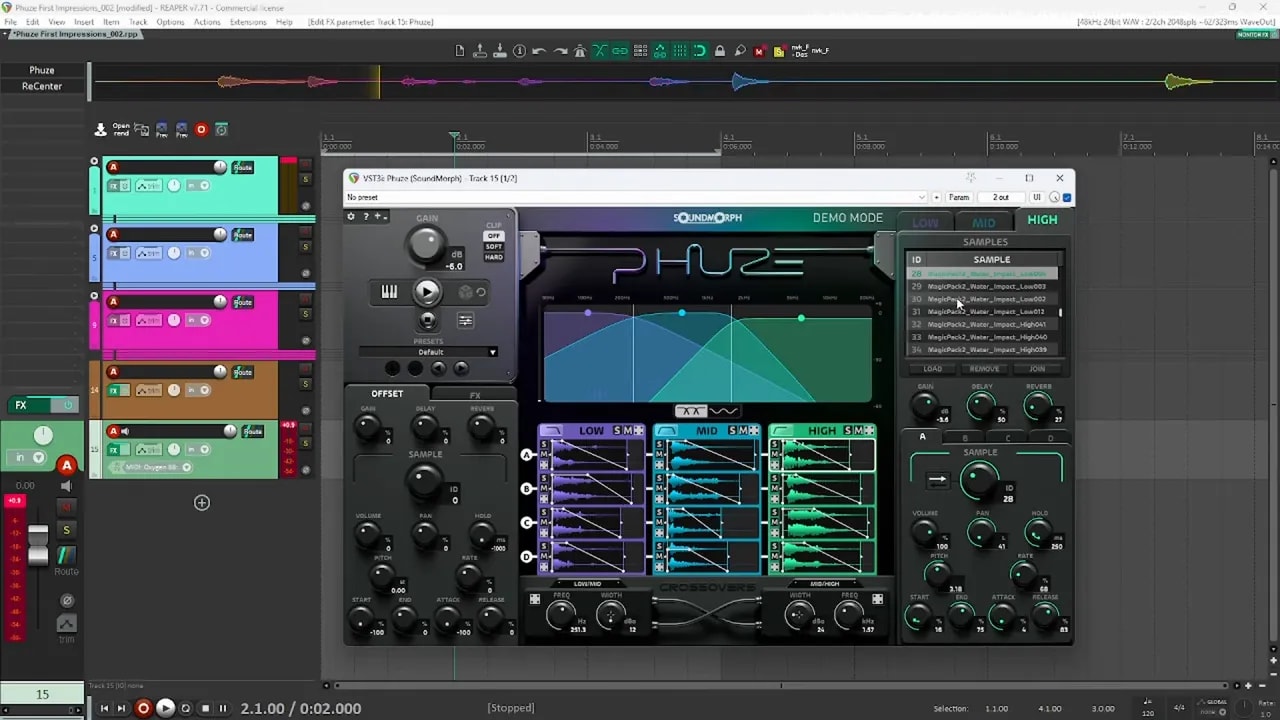
I loaded in sword and shield impact material and tried to force the layers to hit together by:
- Reducing the hold
- Trying to align the attacks more tightly
- Shortening the sound with the end control
Even then, the impact still felt loose. Some source files had swings before the hit, some had slightly delayed transients, and the band split made the whole thing feel less unified. It did create some cool stylized metal textures, but not the kind of solid, grounded hit I would usually want for realistic melee design.
This is the key tradeoff with the plugin:
- Great for abstraction and texture
- Less effective for realism and physical impact
That does not mean it is bad. It just means it has a lane.
The biggest workflow issue: loading samples takes too long
This was the main drawback for me.
The actual sound generation is fun. The setup is what slows things down.
To clear old sounds and load new ones, the process feels more manual than I would want. You have to remove content from each bank, go find the source files, select them, then drag them into the low, mid, and high sections.
That may not sound terrible on paper, but in practice, it adds a lot of friction. And for sound design tools, friction matters. If loading sounds interrupts your momentum, it can kill the creative flow fast.
I also found it frustrating that I could not just drag in a folder and let the plugin work from that. Having to search and load sets manually every time feels slow, especially if you are trying lots of ideas in a short session.
This stood out even more when comparing it to faster workflows in Reaper, where tools can generate layered variations much more quickly.
So for me, this is the closest thing to a deal breaker. A plugin built around fast experimentation really needs a faster import process.
Other things I think could be improved
Beyond loading time, there are a few other areas where I think Phuze could be stronger.
1. MIDI triggering could do more
Right now, MIDI is mainly a trigger. Press a key, and the sound plays.
What would be much more useful is if the MIDI note position also changed the result. For example:
- Lower notes could lower pitch or playback rate
- Higher notes could raise pitch or playback rate
That would make it feel more like an instrument instead of just a trigger button on a keyboard.
2. The band system feels a little locked
The three-band setup is the core idea of the plugin, but there are moments where it feels too fixed.
You can disable bands, which is useful. But if you want to work with only two bands, the crossover behavior feels limited in some cases. It would be nice to have more freedom when reshaping the band ranges.
3. Modulation would add a lot
Some kind of built-in modulation and effects engine would be a great addition.
Even small options would help, such as:
- LFO-style motion
- Envelope-based movement
- Sound-following modulation
- Modulated effects
For a plugin that already leans toward expressive and experimental design, modulation feels like a natural fit.
4. Better ENVELOPE shaping
Another thing I personally like when triggering sounds from a keyboard is the ability to hold a note and release it to stop or tail the sound.
In Phuze, once the sound is triggered, it keeps playing through to the end even if you release the key right away. For long sounds, that can be limiting.
I would prefer a mode where:
- The sound sustains while the key is held
- The release stage starts when the key is let go
That would make shaping and performing sounds much easier without needing extra manual edits.
Who I think Phuze is really for
This depends a lot on what tools you already use and what kinds of sounds you create most often.
Phuze makes sense if:
- You work in Nuendo, Pro Tools, or another DAW where you do not already have a similar workflow tool
- You make a lot of sci-fi, robotic, abstract, fantasy, or UI sound effects
- You want a fast way to generate variations from your own source libraries
- You like tools that create happy accidents and unusual combinations
Phuze may not be the first tool to buy if:
- You mainly design realistic, grounded sounds
- You already have flexible layering tools inside your DAW
- You need the fastest possible workflow for loading and arranging sound sets
If you already use Reaper, I would personally look at broader workflow tools first before adding Phuze, especially if you need one tool that can handle many different sound design jobs. Phuze feels more specialized.
That said, one thing it does very well is variation generation. Once you have a sound that is close, it is easy to scan through offsets and shuffle settings to get related versions. That alone can be very useful.
Final thoughts
Phuze has a genuinely cool idea behind it.
The frequency-based layering engine makes it easy to build sounds that feel rich, strange, and textured. For abstract design, sci-fi work, robotics, futuristic UI, and magical material, it can produce strong results very quickly.
Where it loses me is workflow speed and realism. Loading samples takes too long for the kind of quick experimentation this tool seems built around, and the band-based design can make grounded sounds feel disconnected.
So my take is pretty simple:
- Very cool concept
- Strong for abstract and stylized sound design
- Less convincing for realistic impacts and natural sounds
- Could be much better with workflow and MIDI improvements
If your work leans heavily into cinematic sci-fi, creature design, tech textures, and experimental layering, this plugin is worth a serious look. If your priority is realistic sound effects or maximum speed, you may want to compare it with other options first.
For broader sound design reading and tutorials, the sound design blog has more resources worth exploring. If you want a free collection of sounds to experiment with, you can also grab the free sound designer starter pack.
Additional resources
FAQ
What is Phuze by SoundMorph?
Phuze is a sound design plugin that layers samples across low, mid, and high frequency bands. It is built for creating new textures and variations by combining sounds in unusual ways.
What kind of sounds is Phuze best for?
It works best for abstract, sci-fi, robotic, mechanical, magic, fantasy, and UI-style sounds. It shines when the goal is texture and creative variation rather than realism.
Is Phuze good for realistic sound effects?
It can create interesting results, but it is not the best fit for grounded, realistic sounds like natural impacts or believable water splashes. The frequency-band layering can make those sounds feel disconnected.
What is the main downside of Phuze?
The biggest issue is workflow speed. Loading and clearing sample sets feels slow and manual, which can interrupt creative momentum.
Can Phuze help create sound variations quickly?
Yes. That is one of its strongest features. Once you find a sound you like, you can use sample offsets and selective randomization to create many close variations very quickly.
Is Phuze worth trying if I already use Reaper?
If you already have flexible layering tools in Reaper, Phuze may feel more like a specialty tool than a must-have. But if you want its band-based layering approach for abstract or futuristic design, it still offers something unique.
Is there a discount code for Phuze?
Yes. The code DAVID gives 20% off on SoundMorph orders, including Phuze and sound effects.