You don’t need recordings of a herd of animals to build a convincing stampede. A few everyday foley props, some heavy impacts, and a way to randomize them can give you a useful foundation.
I recently needed an animal stampede to move across the screen for a project, but I didn’t have the right running sounds in my library. So I built it in Reaper using recordings I already had, a pair of hearing protection earmuffs, and Shrapnel.
The idea was simple: combine ground texture, weight, hoof-like detail, and close impacts, then process them into one full, heavy sound.
1. Gather Foley Recordings With Different Jobs
Rather than searching for one perfect stampede recording, look for sounds that can contribute different parts of the effect.
- Hoof-like sounds: Hollow, cupped impacts that suggest animals running.
- Heavy impacts: Hits with enough body to suggest large animals striking the ground.
- Dirt and ground texture: Impacts that include the sound of the surface.
- Close, punchy detail: Short, clicky hits that feel nearer to the listener.
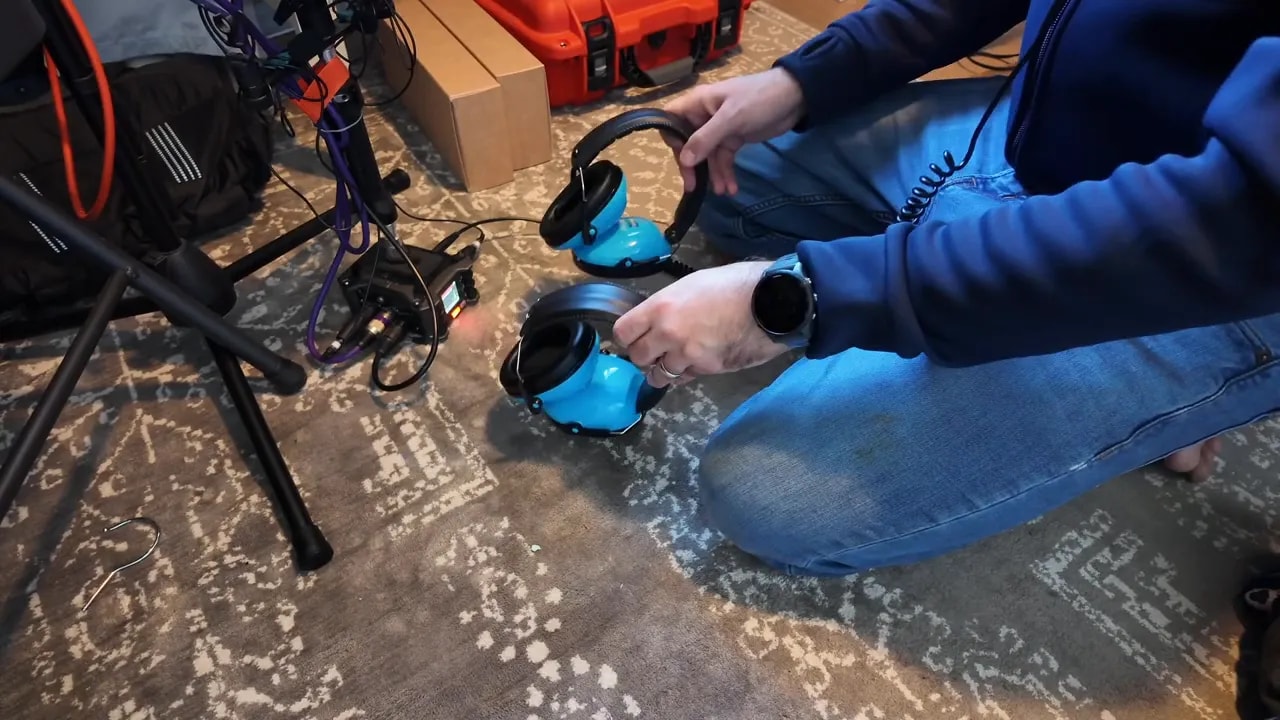
Coconuts are a common prop for performing hoof sounds, but I didn’t have any. What I did have was a pair of hearing protection earmuffs. Turning them upside down and performing with the cups against the floor gave me a hollow, cupping sound that worked as one of the layers.
I also pulled in impact recordings I had previously designed for my melee weapons pack. These were long files containing lots of different takes, which made them useful for randomized playback.
Some of those impacts sounded much too close on their own. That wasn’t necessarily a problem. With filtering, they could still work as part of the larger texture. Other recordings already had the weight or dirt detail I wanted.
Choose sources for what they contribute to the final sound, not just what they sound like in isolation. That approach also fits into my broader sound design workflow for creating almost any sound effect.
2. Use Shrapnel to Randomize the Impacts
I used Shrapnel as the granular tool for turning those recordings into a mass of overlapping footstep-like sounds.
Instead of manually placing every hit, I assigned sounds to different particle interactions:
- Particles hitting a collider triggered the first ground layer.
- Particles hitting the sandbox boundaries triggered another impact layer.
- Particles colliding with each other triggered additional hoof-like and close-impact sounds.
For the long recordings, transient-based playback let Shrapnel select different hits within the file. A transient is the sharp beginning of a sound, such as the attack of a footstep or impact. Detecting those attacks gave the patch different takes to choose from.
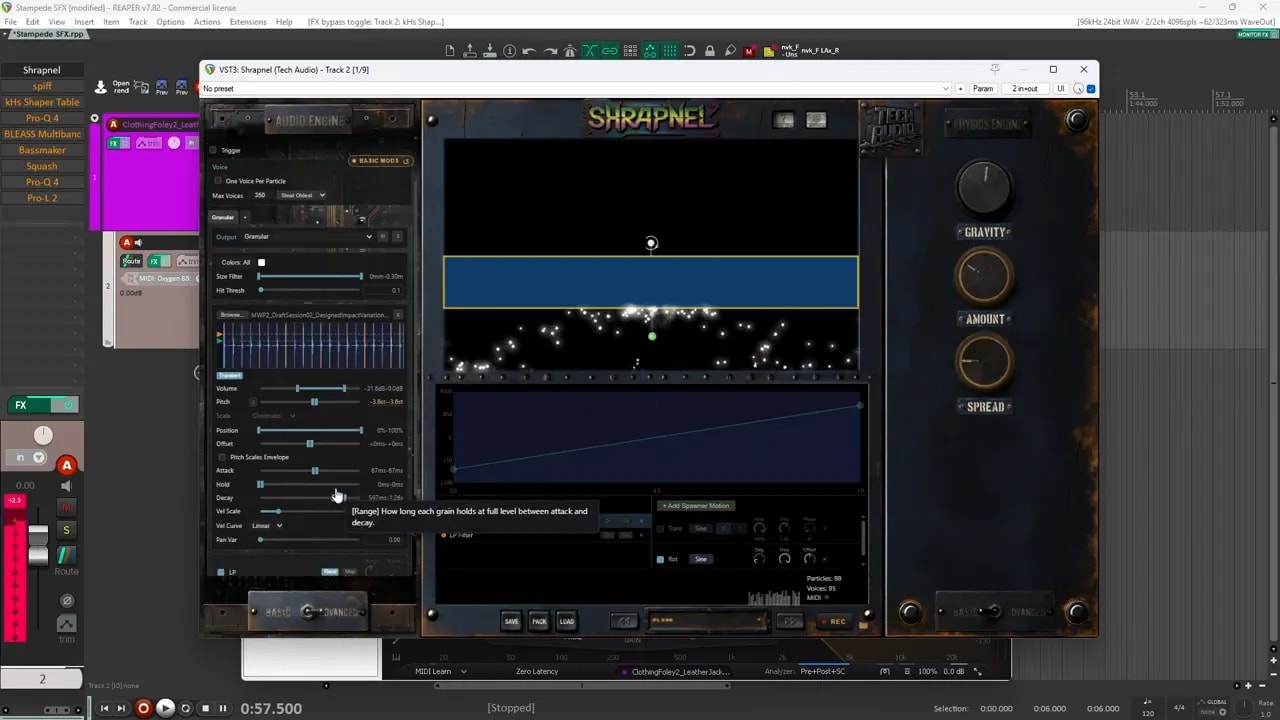
I also pitched the source material down a little to make it feel heavier. From there, I built the patch one layer at a time.
3. Build the Four Stampede Layers
Layer 1: Centred Dirt Impacts
The first layer used a ground-impact recording, which sounded like one of my dirt sources. Each time a particle hit the collider, it triggered a hit. Transient-based selection provided variation within the recording.
The setup was fairly simple:
- Keep the panning centred. This layer formed the middle of the sound.
- Lower the pitch slightly. This helped give the impacts more weight.
- Apply a low-pass filter. The unfiltered source had more high-frequency detail than I wanted.
- Increase the decay enough for the selected hit to play through. I didn’t want the playback envelope cutting it short.
This gave me a grounded starting point. It wasn’t a full stampede yet, but it established the surface and some of the weight.
Layer 2: Wider Impacts for Body
The second layer used the sandbox boundaries. Whenever a particle hit an outside boundary, it triggered another impact sound.
This source had a boxier quality and added more body. On its own, though, it was quite clicky. I used both a low-pass and a high-pass filter to make it more controlled.
The other important difference was panning:
- Layer 1 stayed in the centre.
- Layer 2 had much more pan variation.
That gave the sound a centred foundation with impacts spread across the stereo field. The combination was useful, but it still felt sparse rather than like an ongoing herd.
Layer 3: Earmuff Foley for Hoof-Like Texture
Next, I enabled particle-to-particle collisions and used the earmuff recording as another source.
Shrapnel detected the different transients in the recording, allowing those collisions to trigger different hits. The result was a little poppy and bubbly, but I liked what it added to the overall texture.
For this layer, I used:
- A low-pass filter to tame the top end.
- Some panning variation.
- A longer decay so each selected take could play through.
The earmuffs didn’t need to sound exactly like hooves by themselves. Their hollow attack added a useful character once mixed with the heavier ground sounds.
Layer 4: Jacket Punches for Close Detail
The fourth layer came from leather jacket punch recordings. Here, I selected individual samples rather than relying on transient detection across one long file.
I kept the takes that were:
- Clicky.
- Punchy.
- Short and direct.
I left out the hits with more of a whooshing quality or a longer tail. I wanted this layer to feel close to the listener, and the tighter attacks helped with that.
Together, the jacket punches and earmuff hits created the closer detail. Underneath them, the first two layers supplied the ground texture, body, and weight.
Each layer had a different role. That was more useful than simply stacking several similar impact sounds.
4. Process the Layers Into a Full, Heavy Stampede
With all four layers running, I had the main ingredients, but the sound still felt a little too sparse. It needed more fullness and weight.
I used the following processing chain to bring it together.
- Spiff for transient emphasis. I boosted some of the attacks to bring out more pop, clickiness, and that slightly bubbly detail. Listening to the delta signal let me hear just what the processor was adding.
- Distortion. This added density to the combined sound.
- EQ to tame the low end. Before adding more weight, I controlled the bass that was already there.
- Multiband compression. This helped bring out the highs and glue the layers together.
- Bass enhancement. I used a bass-making processor to add some weight back into the sound.
- Additional squashing. This made the result more compact and dense.
- Limiting. A limiter controlled the final peaks.
The low-end EQ and bass enhancement served different purposes. One controlled the existing bottom end; the other added weight back after the layers had been shaped.
The goal wasn’t just a louder sound. I wanted the separate impacts to feel more like one continuous, heavy mass of movement.
5. Use Filtering to Control Distance
After the main processing, I used another EQ as a distance filter.
Reducing the high-frequency content made the stampede sound farther away. Opening the filter brought back the detail and made it feel closer.
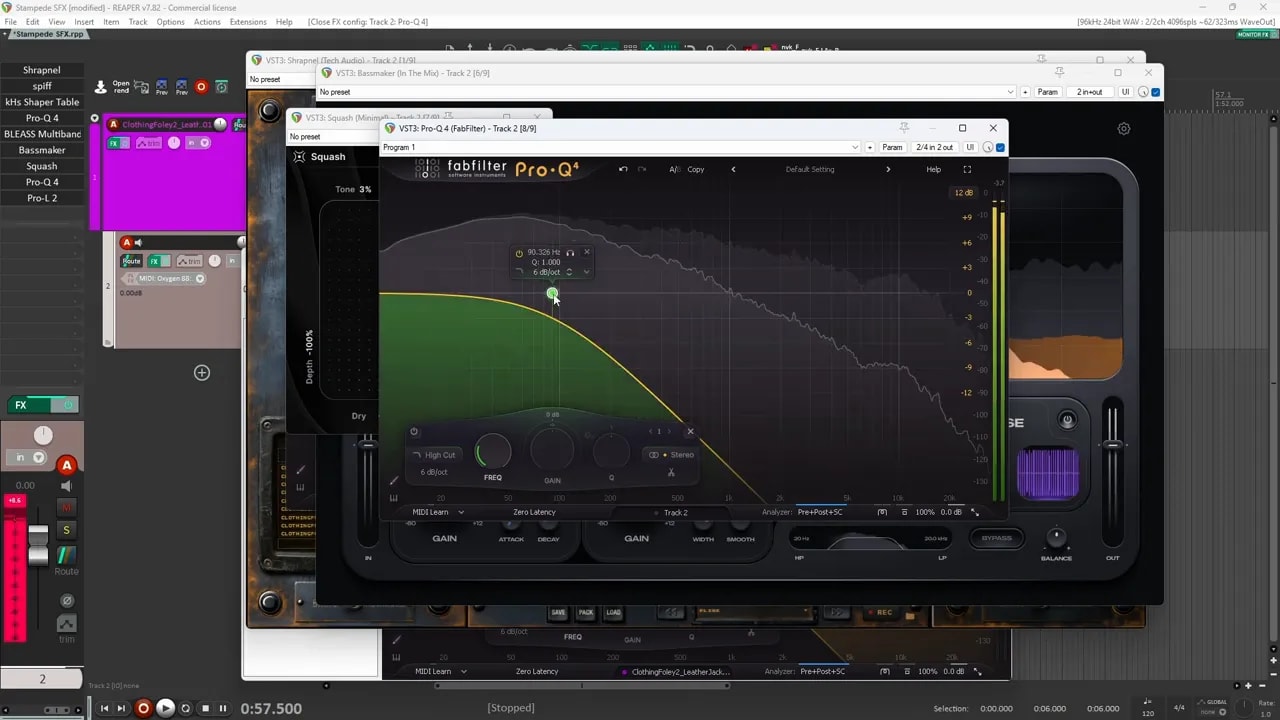
This gave me a straightforward way to change the perceived distance of the whole foundation:
- More closed filter: A darker, more distant stampede.
- More open filter: A brighter, closer stampede with clearer attacks.
It’s worth separating this from the filtering inside the individual layers. Those filters shaped the source sounds so they worked together. The final filter changed the perspective of the combined effect.
6. Add Animal Sounds and Distinct Movement
The layered impacts were the foundation, not the entire finished design.
For my project, I added animal cries and screeches on top. Those sounds helped turn the mass of running impacts into something that clearly suggested a group of animals.
You can also build on the foundation with:
- Whooshes for additional movement.
- More distinct footsteps for individual hits that stand out from the herd.
- Animal vocalizations to give the stampede its identity.
The main takeaway is that you don’t have to start with literal animal recordings for every part of an animal stampede sound effect. Ground impacts, earmuff foley, and jacket punches can do a lot of the work.
Give each source a job, randomize the hits, and shape the layers together. Once that foundation feels full and heavy, the animal sounds and movement details can finish the design.